Sunday, January 31, 2021

Brave Browser Wallet BAT Earnings Are Gone To 0.0 Uh oh!

Today I just noticed that the BAT (Basic Attention Token) in my brave browser rewards became 0.0 but when I click the details I can see the summary from previous months. Maybe this issue is just temporary? Auto Contribute is set to OFF since I'm not donating any to Website Owners since then.

Also, there is a message 

"Uh oh! The Brave Rewards server is not responding. We will fix this as soon as possible."


But the real problem is uphold is not accepting accounts from Philippines anymore. 
With this, I will not be able to widthraw all the tokens earned since I started to use Brave Browser.
This is another sad story... Earnings are gone...


Monday, November 30, 2020

How to mine just selected algorithm on nicehash miner.

 To do that, just go to benchmark tab and disable other miner and algo. Please see image below for reference.


Saturday, November 7, 2020

Tutorial: How to dual mine ETH+ZIL / Bitcoin in AMD 4GB graphics Card using Phoenix Miner 5.1c and 5.2b in Windows 10 64bit

What you need to Dual mine? Let's start!

Operating System - Windows 10 System / Rig with atleast 4GB Graphic Card installed with a working GPU driver installed ofcourse. 

Eth Wallet and Zil Wallet - We'll be using Binance Wallet for this one. You can create a free account here or https://www.binance.com/en/register?ref=RP885HET 

Mining Pool - Since we'll be dual mining Eth+Zil, we'll use Ezil Pool or https://ezil.me/?p=7d66

Mining Program / Application - We'll be using Phoenix Miner 5.1c (low dev fee) 
Download my pre configured miner here or go directly to their website at https://phoenixminer.org/ and look for the download link. After downloading, extract the compressed file to your prefered folder.

Update: November 10, 2020 - Due to DAG issue, please update Phoenix Miner to 5.2b and add -daglim 1 in the command line parameters. This will fix low hashrate in 4GB Cards.

Now, open the folder of the Mining program and look for the file named listdevices.bat and double click that to see which GPU are available in the System. As you can see in the example below, there are GPUs which can't be use for Eth (below 4GB Memory) so we'll exclude that. You need to choose only 4GB or above in order to mine properly else the program will just restart on loop due to an error. 

In my pre configured Miner, you will see that I'm only using GPU 2 GPU 3 and GPU 5. 

 
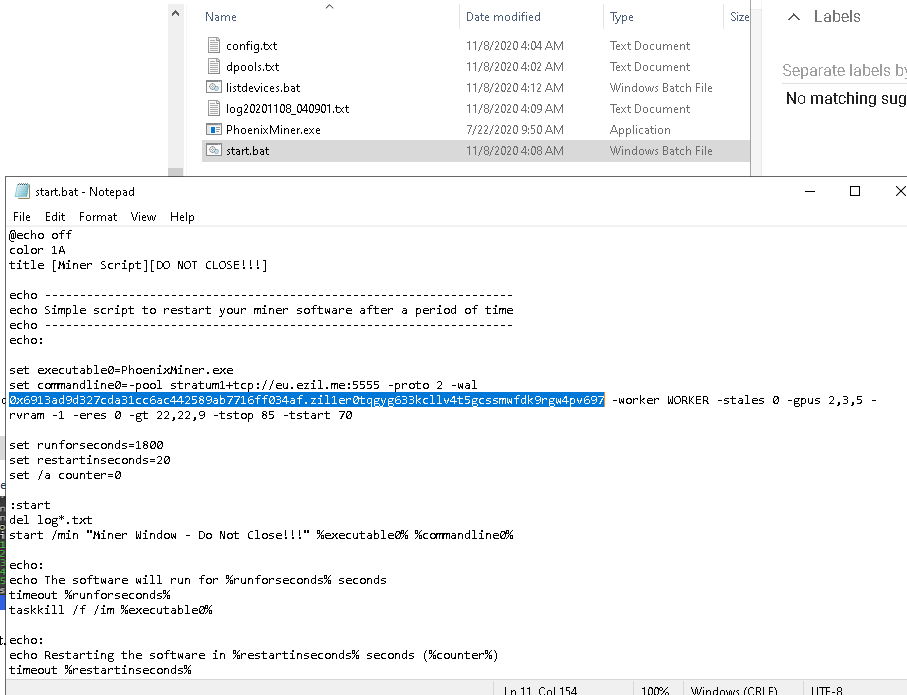
Next, edit start.bat put your own GPU details and replace the Eth and Zil wallet of your own. On example below, you will see that my Eth address and Zil address are combined. It is only separeted by a dot (.) Also, my start.bat file is not the same from Phoenix website as I've already configured it according to my needs. But you can use this if you want or just make your own.


What my start.bat script does is just automatically delete the log files created by the Phoenix Miner program open the Phoenix Miner program in a new window and then restart the miner according to my prefered time in seconds and you can change this option. You will see that option inside set runforseconds=1800 so my Miner restarts every 30 minutes.


BTC Donation: 
NiceHash: 3CT2grPjB28kqD2ofyeF1672J5tc2DrPw9
12ixDsxE3vVncQnv8KBemZKyNFtaajTA8y

ETH Donation : 
NiceHash: 0x18e0d077f6f9f77c2be65b8517096c6d6f421797
Binance: 0x6913ad9d327cda31cc6ac442589ab7716ff034af

ZIL Donation : 
Binance: zil1er0tqgyg633kcllv4t5gcssmwfdk9rgw4pv697
Zilpay: zil1h79vzrltlv43d5nnamh7858urq06acspfur7ng

Ripple Donation :
NiceHash: rGZV96HKpRbPCHbeYdtqE8Z5F74ULZ8o7E

Thats it! Have Fun! Cheers! =)


Friday, October 23, 2020

Watch Full Tagalog Action Comedy Movie 2020 Free Online - Stay At Home And Be Safe

Watch Free Action Tagalog Comedy Movie! No sign-up or registration is needed! Free For All! Enjoy!

Saturday, October 3, 2020

How to mine Etherium / ETH using RX550/RX570 4GB Graphics Card in Nice Hash

Can you still mine Etherium or ETH in an AMD 4GB Graphics Card in Nice Hash? Well, yes in my experience. I'm still using my old RX550 4GB and RX570 4GB Graphics Card. I usually mine using Nice Hash Miner but the problem is ETH mining using Claymore, Phoenix or TeamRed Miner is not working anymore using Nice Hash Miner GUI. I have installed all the plugins (miners) but mining ETH does not apear in the list. See screenshot below.

The only solution for me is to mine manually using the main miner program in command prompt or cmd. I'm using Windows 10 by the way and Phoenix Miner works best in my RIG as of this moment of writing.

I beleive that NH Miner choose the best Algo or the most profitable coin for us but what if you I still want to mine the Algo you like and NH is not correct? 

On below screenshot from NH statistics website, My 3x 4GB GPUs are mining kawpow algo using the NH Miner Application. That is because it was suggested on the benchmark (the best coin or algo to mine). Don't mind the other one mining BeamV3 it is not an AMD GPU. It is a Zotac P106-90 3GB that I bought online from China. =)


See another image below. 


Then, I have tried running Phoenix Miner 5.1c (latest one I think) in CMD and I can see that it is more profitable mining ETH than kawpow as of this moment and the Hashrate is still higher compared to mining kawpow algo. I'm not sure why does NH removed the ability in their GUI Application to mine ETH using low end graphics while it can still. So sad for me but I can't afford to buy the lastest GPU.


Below is a sample config that you can copy and save as your start.bat

@echo off
title [NiceHash Miner Script][DO NOT CLOSE!!!]
setx GPU_FORCE_64BIT_PTR 0
setx GPU_MAX_HEAP_SIZE 100
setx GPU_USE_SYNC_OBJECTS 1
setx GPU_MAX_ALLOC_PERCENT 100
setx GPU_SINGLE_ALLOC_PERCENT 100
PhoenixMiner.exe -pool stratum+tcp://daggerhashimoto.jp.nicehash.com:3353 -wal 3CT2grPjB28kqD2ofyeF1672J5tc2DrPw9 -pass x -proto 4 -stales 0 -gpus 2,3,5 -rvram -1 -eres 0 -gt 17,23,9
pause

Official Phoenix Miner Link https://phoenixminer.org/download/latest/

Note:

Similar Error in Claymore Miner: 

Not Enough GPU Memory to Place DAG 

Cannot Allocate Big Buffer For DAG 

Cannot Write Buffer For DAG 

Tuesday, September 22, 2020

This device cannot find enough free resources that it can use. (Code 12) If you want to use this device, you will need to disable one of the other devices on this system.

This problem occurs in Windows 10 when I added a new graphic card in my mining rig.The integrated graphics card (built-in graphics) becomes problematic as per image below and it is my Primary graphics connected to my Monitor. I don't want to use any of the RX570 as the purpose of that cards is primarily for mining bitcoins only.Although it is still useable without the drivers loaded, I cannot play games that required good graphics.
Currently, I'm just using a PCI Expansion Card 1 to 4 PCI Slots USB 3.0 Converter.
I'm not sure but I'm suspecting that this is the main problem since the motherboard (EMX-A70FM2+iCafe) has 2 PCIE slot only.
Rightnow, I'm planing to use Linux OS instead to see if the issue will be resolve.

Update: It is now fixed!
I just enabled Surround View in BIOS and set the built-in graphics (R7) to 1GB only

Sunday, August 9, 2020

I'm still thinking of another topic which I will put on the next post. Surely it's not about covid 19 or Corona Virus. Maybe How to Earn Money from Home by using Computers or IDLE Computers? Perhaps Mining BTC (Bitcoin) will do. Stay tune...

Webmasters... You will earn 25% of cash commissions from each purchase that your referral makes on below. Free traffic for your sites! Join now!