Monday, February 29, 2016

Monday, November 30, 2015

Windows 7 Driver for Creative Soundblaster PCI Soundcard

Below are the Hardware Ids I found on Windows Device Manager.
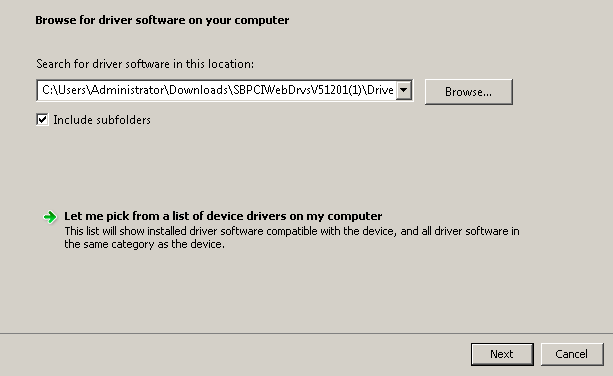
I have installed the driver manually and it works fine but game port driver is not working.
It's ok with me since I'm not using it. :)

PCI\VEN_1274&DEV_5880&SUBSYS_20001274&REV_02
PCI\VEN_1274&DEV_5880&SUBSYS_20001274
PCI\VEN_1274&DEV_5880&CC_040100
PCI\VEN_1274&DEV_5880&CC_0401

Driver Download Link

Note: Do not run the executable.
Extract it to a folder and install the driver manually or it will not work!


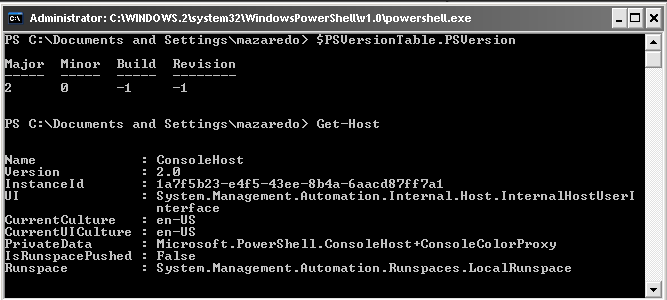
Download links for Windows Powershell 1 & 2 and Dotnet Framework 2.0 x86

Download Links for Microsoft Windows Powershell English-Language


Windows Powershell 1 for Windows XP (KB926139)


Download from Microsoft Website
Download mirror from 4shared.com

Windows Powershell 2.0 / Windows Management Framework Core for Windows XP (KB968930)

Download from Microsoft Website
Download mirror from 4shared.com

Note that Powershell requires Microsoft Dot Net Framework 2.0 or above so this must also be installed.

Download from Microsoft Website
Download mirror from 4shared.com


Monday, September 21, 2015

bluestacks running on oracle virtual box

Some says BlueStacks will not run on a Virtual Machine. I disagree! :)

Below is a screenshot of BlueStacks Application running on Oracle VM VirtualBox.

I'm gonna play CoC later...

VirtualBox Version:  4.3.12r93733
Host OS: Windows 7 64bit
Client OS: Windows XP SP3 32bit


Sunday, September 6, 2015

How to change Control Panel as icon view instead of Category View in Windows 7 Ultimate Edition in CMD

OS Name:    Microsoft Windows 7 Ultimate
Version:    6.1.7601 Service Pack 1 Build 7601

Open command prompt as Administrator "Run as administrator" or some called this as an Elevated Command Prompt.

On command prompt window, input command below and hit enter!

REG add "HKCU\Software\Microsoft\Windows\CurrentVersion\Explorer\ControlPanel" /v StartupPage /t REG_DWORD /d 1 /f

Done!


Monday, August 31, 2015

How to remove OVO Agent completely from a Windows 2012 VM

While doing RTPA today I noticed that the OVO Agent installed on one of the Machine got errors.
This is for a new Windows 2012 VM that should be delivered today to our client.

See error code below for reference:

C:\>opcagt
**** some lines removed ***
perfalarm     (Alarm generator)                                       Stopped
perfalarmsrv  (Alarm generator service)                               Stopped
**** some lines removed ***

(ctrl-21) Communication error when executing 'Status' method.
 (xpl-333) recv() on '[::1]:50292' failed.
  (WIN-10054)


I have searched over the Internet and from our internal webpages but unable to find the right solution.

The commands opcagt -kill opcagt -cleanstart and ovc -kill ovc -start does not help much.

Now I decided to completely remove the OVO agent and just reinstall them from the start.

Remove the agent (Command below in BOLD characters)


C:\temp\itopackage11.14-winAgentOne-x64\A1bins\packages\WIN\Windows_X64> 

oasetup.exe -remove -clean

INFO:
Verifying the product version to be removed
*** some lines removed ***

INFO: Removing the component HPOpsAgt ...
INFO: Removing the component HPOvPerlA ...
INFO: Removing the component HPSharedComp ...
INFO: Removed startup menu folder items.
INFO: HP Operations agent removal completed...

Now it's completed and hopefully my re installation will work correctly... :)


Friday, August 14, 2015

how to install unetbootin in puppy linux 5.2.5

I wan't to create a bootable flash drive but I'm having issue with the latest unetbootin (unetbootin-linux-613.bin) in puppy linux. 

My Kingston DT Micro 8GB USB drive is not detected as shown below.


I've search over the Internet and end up using the older version of unetbootin (unetbootin-linux-494) which has the option of showing all the drives in my system.


Some issues:

There was an alert showing that pzip, mtools and sfdisk are missing in my System so I need to install them manually. Luckily I still found them on some reference links I mentioned below.

But for others convenience, I've also uploaded the files on 4shared which can be downloaded easily.

Note that for sfdisk file, just copy it to your root\sbin folder.

http://www.4shared.com/file/TFWnQbseba/sfdisk.html
http://www.4shared.com/file/DiavAXtaba/mtoolspassaggio.html
http://www.4shared.com/file/jHYd_DVjba/p7zip-full.html
http://www.4shared.com/file/dN2P7-Oyce/unetbootin-linux-494.html


References:

sfdisk from util-liux

https://www.kernel.org/pub/linux/utils/util-linux/v2.27/

http://www.murga-linux.com/puppy/viewtopic.php?p=347080

p7zip-full.pet, mtoolspassaggio.pet and unetbootin.pet

http://www.murga-linux.com/puppy//viewtopic.php?t=42450&sid=73709a1c0576fe020fd50d0d3938ef6a