Friday, October 3, 2025

80's music new wave hits playlist

The Best old but gold music playlist I found. Feel free to listen everyone. Hope you'll enjoy this one. Have a great day ahead :) 

http://isko.freehostia.com/music/android

Click this link to listen

Sunday, August 17, 2025

Golden Guppies For Sale

 I'm selling some fish to everyone.

#golden #guppies


Saturday, January 11, 2025

How to permanently hold FN key in mini keyboard from shopee and lazada

Just click the Num Lock button in the upper right side of the keyboard. See image below for reference.


These are generic cheap, cute,tiny, slim, little usb keyboards and most of these came from China 

Some with stickers or printed with ASUS, ACER, HP, IBM, DELL, LENOVO, MICROSOFT etc.

Cheers! Thank me later. =)


how to permanently hold fn key in asus mini usb keyboard

how to permanently hold fn key in acer mini usb keyboard

how to permanently hold fn key in hp mini usb keyboard

how to permanently hold fn key in dell mini usb keyboard

how to permanently hold fn key in lenovo mini usb keyboard

how to permanently hold fn key in ibm mini usb keyboard

how to permanently hold fn key in logitech mini usb keyboard

how to permanently hold fn key in microsoft mini usb keyboard

...

Monday, March 4, 2024

Download messenger fix traffic.dll qwave.dll and winsparkle.dll error for windows 10

Extract all dll files to windows\system32 directory

This woks with Windows 10 and might work with other version.

download fix https://drive.google.com/file/d/1IqDjGi2jgnt2IsmssRO4LcWYB-xUAeDF/view?usp=sharing

download messemger  https://drive.google.com/file/d/1Tp6lzTHqE0YLI0w1UsU035MEM5Qmnu26/view?usp=sharing

Thank me later! =)

#messenger #error #qwave.dll #traffic.dll 3winsparkle.dll #fix #solution


Tuesday, November 14, 2023

fake clone poco f3 mainboard mt6582 1gb ram 8gb rom

 This is what inside this POCO F3 clone mobile phone.

Hardware : MT6582
Model : F3
Build number : LRX21M test-keys
Build date UTC : 20220105-091726
Android  v : 5.0
Baseband v: MOLY.WR8.W1449.MD.WG.MP.V1.P8,MOLY.WR8.W1449.MD.WG.MP.V1.P8, 2020/09/14 20:17
Kernel v : 3.10.54 (android@kst-10) (gcc version 4.8 (GCC) ) #1 SMP  Wed Jan 5 17:31:23 CST 2022

#poco #f3 #clone #mt6582 #mediatek #1gbram #8gbrom

Saturday, July 29, 2023

How ro Fix Error Roblox Requires Microsoft Internet Explorer 6.0 Or Greater on Windows

This error is due to Internet Explorer version is missing in the Windows Registry

To fix just add this information below.

Windows Registry Editor Version 5.00

[HKEY_LOCAL_MACHINE\SOFTWARE\WOW6432Node\Microsoft\Internet Explorer]
"Version"="9.11.22000.0"

Note: It doesn't matter what version of Internet Explorer is installed on your Windows 

But that should still fix the issue. Look mine below! Hahahah....

Cheers!


Monday, July 24, 2023

How to flash dead or corrupted xiaomi redmi 9 The System Has Been Destroyed

This steps does not need xiaomi redmi account. Also no need  to unlock boot loader. 

The phone will be formatted / erase completely to factory default and all data will be lost. 

Steps:

- download and extract the firmware for redmi 9 (The version I've used is V11.0.4.0.QJCMIXM)
- download and install android usb driver New_QcomMtk_Driver_Setup_V2.0.1.1 / UsbDk_1.0.22_x64
- download and install Python for Windows
- download and install libusb-win32-devel-filter-1.2.6.0
- download and extract MTK Bypass Tool mtk_bypass_rev4
- download and extract SP Flash Tool SP_Flash_Tool_v5.1924_Win

Now assuming that the phone can be detected by the Computer in device manager in ports (com and lpt)

- start bypass tool
- start sp flash choose format all and uncheck options for "check lib" and "storage life"
- power off phone
- insert the type c usb cable holding volume down (hold still)
- start bybass tool
- start flash and wait

I've already provided the filenames for you to easily search on google and download them but

I can also provide the download links if you need. 

Just ask =)

#format #xiaomi #redmi9 #deadboot #bootloop #spflashtool #rooting #firmware #reformat #unlocked #bootloader #corrupted #bricked #android #phone #TheSystemHasBeenDestroyed

Thursday, June 29, 2023

How to disable and enable network adapter in windows via cmd

This command requires elevated command prompt - CMD must Run As Admin

First run this command to see which adapter is available in your system

cmd:\>netsh interface show interface

Sample output below

 Admin State    State          Type             Interface Name
-------------------------------------------------------------------------
Enabled        Connected      Dedicated        Local Area Connection


cmd:\>netsh interface set interface name="Local Area Connection" admin=DISABLED

cmd:\>netsh interface set interface name="Local Area Connection" admin=ENABLE

That's it you have successfully disabled and enable your network adapter


Tuesday, December 20, 2022

Used Personal Computer For Sale

Complete Set Computers For Sale in Good Working Condition

Basic CPU Specifications:

Processor :  AMD Athlon / Intel Core 2 Dual Core 2.4 - 3.0 GHz 

Motherboard : ATX Socket AM2 / AM3 / LGA 775 w/ built-in Sound / LAN / USB Ports

Memory : 2GB - 4GB DDR2/DDR3 Memory (Kingston / Samsung / Hynix

Casing : Mini - Full Tower ATX Casing w/ 280 - 600 Watts Power Supply

Hardrive : 80 GB - 500 GB Western Digital / Seagate Barracuda 7200 RPM Sata HDD 

Monitor :  Standard 17 inches LCD Monitor (Square Type)

Floppy Drive : By Request

CDRom / DVD Rom : By Request

AVR : 500 Watts Automatic Voltage Regulator

Free Keyboard, Mouse, and USB Speaker or Headset


Price : PHP 5,000.00 Only


Pick-up Address : 881 Trapiche Road Purok 4 Tanauan City Batangas 4232 Philippines

Contact : Mobile : (Smart) 09295611351

We also accept CPU Repairs, Reformat, Hardware Upgrade and Assembly

Friday, December 17, 2021

Binance BNB to Metamask Wallet Transaction is Successful But Coin Is Missing - Hacker Or Just An Inside Job

Dear Internet,
 
Today, Dec 17, 2021 I've lost 0.16608096 BNB
Approximately ($87.60) in the current market price value which I earned from mining for more than a month or 2.
It is very sad since I'm saving that Cryptocurrency (Money) for our expenses and for my family for this Christmas Season.

It happened when I withdraw from my Binance account going to my Metamask Wallet 0x38da7d32bb06b81cd2c465c685faf106133f50df under BSC Network (Binance Smart Chain).
I stared, wait and refresh a couple of times but I didn't saw it arrive in my Metamask Wallet.
I checked both in Google Chrome and Netbox Browser but it does not appear on either.

Then I checked the transaction records. 
It says that it came in but another transaction occurs just within 6 seconds then it goes out. 
What happened?

All my BNB automatically goes to address below without any confirmation or any mouse click from my end.
0x06ba35cba7e88e5ed8dc54b1dc4d32a0c263178c - Who owns this?

I'm also using the best protection like AVAST Anti-Virus together with Malwarebytes since then.
And because of that, I believed that my Computer is FREE from Viruses, Malware or Spyware.

Upon googling, I also found another person asking for help related to this but using Trust Wallet and not Metamask.
Post can be found on this link

Until now, I'm stuck in thinking Is Binance Still Safe? Is Metamask Still Safe? Will I continue mining Cryptocurrency? Is there a Hacker? Is it an inside Job? What do you think? Blah! Blah! Blah! 

Can someone out there help me retrieve my coins back? Maybe FBI? Who cares anyway!

Best Regards, 
Isko Mazaredo

Saturday, May 29, 2021

watch joker 2019 full english movie - free online streaming - no registration required


Download Link Below

torrent

BTC Donation Address: 3CT2grPjB28kqD2ofyeF1672J5tc2DrPw9
#watch #joker #full #online #streaming #movie

Saturday, April 24, 2021

watch movie mortal kombat 2021 online free no registration


#watch #mortalkombat #download #mortal #kombat #latest #full #freemovies #online #streaming #english #movie #2021

download links

BTC Donation Address: 3CT2grPjB28kqD2ofyeF1672J5tc2DrPw9

Monday, April 5, 2021

Watch The Latest And Top Trending Viral - Newest Sexy Asian Tiktok And Facebook Videos Compilation


#Top #trending #latest #new #viral #sexy #asian #tiktok #facebook #dance #videos

Visit Youtube Channel Below For More Sexy Videos!


Please Like and Subscribe for More Videos!


Sunday, January 31, 2021

How to Earn Bitcoin from Idle Computers or Laptop Free XMR Monero Etherium ETC + Zilliqa Bitcoin Mining Tutorial for Beginners Latest 2021

It this tutorial you will learn how to mine and earn Monero (XMR) or Etherium (ETH) + Zilliqa (ZIL) or Etherium Classic (ETC) + Zilliqa (ZIL) in few minutes. Just follow the instruction below.

Steps:

1. Create an account in Binance 

This is where you will get paid depending on what crypto you will be mining.Once you have created your binance account, you may proceed to second step. Why choose binance among all? Simply because binance support almost all cryptocurrency or coins in the market today that can be converted into real cash.

2. Download the appropriate Software below for bitcoin mining on below link and extract to your chosen folder. 

CPU Mining 

For Monero (XMR) , xmrig is the software that we'll be using and can be downloaded from google drive xmrig 5.3.0 nodev fee sample config is included OR from their website https://xmrig.com/ which you need to do the configuration on your own.

And we'll be using https://minexmr.com/ for the mining pool.

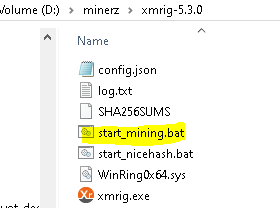
3. Open the extracted folder of CPU Miner (xmrig) edit start_mining.bat in notepad first and input your own xrm wallet address which you can find in binance. To do this, Login to binance.com>Click Wallet>Fiat and Spot>Click Search then input xmr. Click Deposit and Copy your wallet address (Sample on below image). 


After that of course save it then run start_mining.bat with elevation (runas admin).
A new command prompt window will appear and you will see in few minutes that mining is already taking place like in below image and accepted shares means you are now earning.
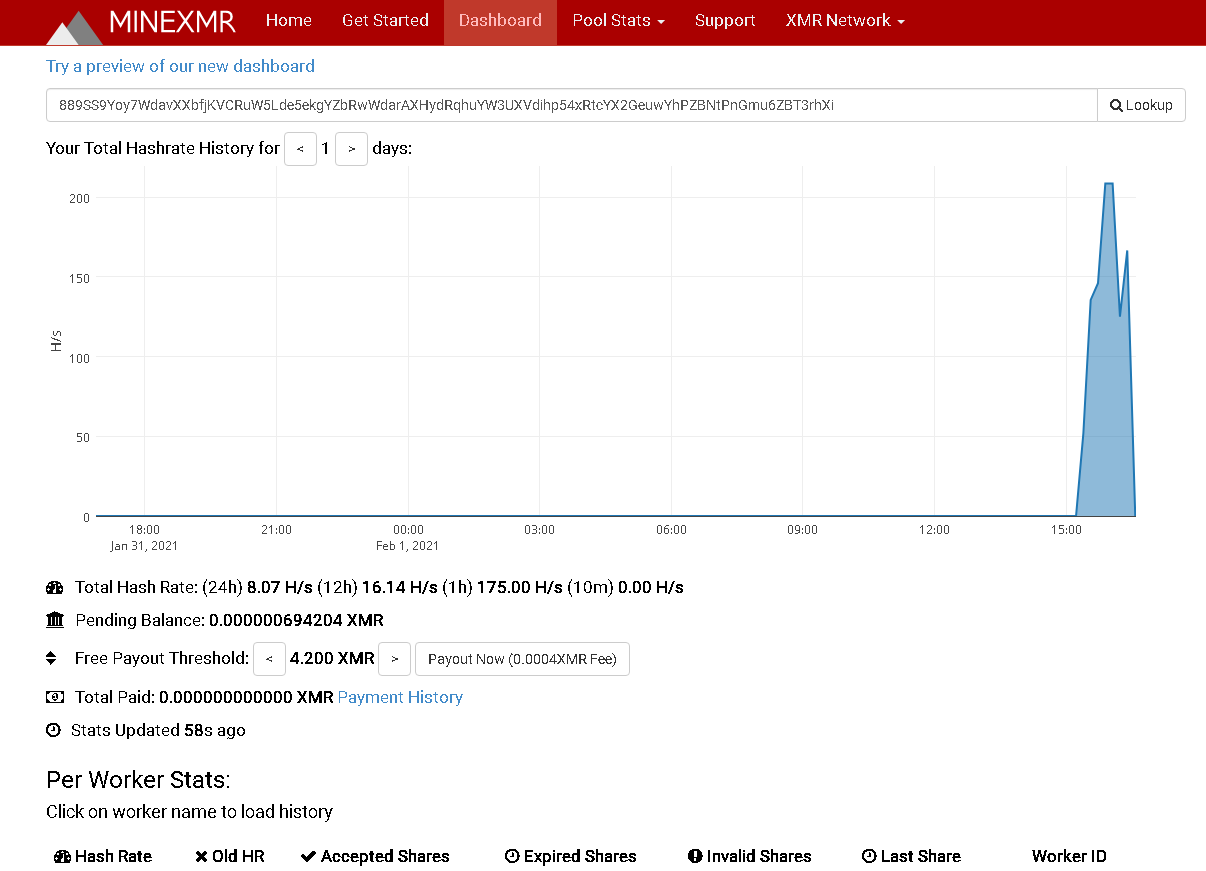
To see your realtime statistics, go to minexmr.com and click dashboard. Put your xmr wallet address that you use and click lookup.

GPU Mining

Etherium (ETH) + Zilliqa (ZIL)  or Etherium Classic (ETC) + Zilliqa (ZIL) 

For this, we'll be using PhoenixMiner 5.5b which you can download from google drive here including sample config OR in https://phoenixminer.org/ 

Extract the file in your chosen folder, run list.bat first to see all available GPU in your Computer.


Note that in screenshot above, Phoenix Miner detected GPU1-GPU5 installed in my Desktop Computer.
GPU1 is the Integrated Graphics Card or some called it built-in Graphics Card which can't be use this time in mining since that's one I'm using in my LCD Monitor.
GPU2 and GPU3 are 4GB RX570 cards and can still be use in ETC/ETH+ZIL mining while GPU4 and GPU5 can only be use in ETC+ZIL as of this writing due to DAG file requirements of Etherium. 

What you need is a minimum of 3GB GPU for ETC+ZIL and minimum of 4GB GPU for ETH+ZIL

You can also test and check your GPU easily by using GPUZ which you can also download from here or just google it. ASUS, ZOTAC, MSI and PALIT. RX and GTX variants are good and can be use in mining.   `   

We'll be using https://ezil.me/ pool for ETH/ETC + ZIL Dual Mining. 

Why dual mining? Simple answer is because it is more profitable than ETH alone. You will earn two (2) cryptocurrency alternately without loosing high in hash rate. 

Just like in CPU Mining above, you just need to edit the start_ETH_ZIL.bat or start_ETH_ZIL.bat Put your own wallet address which you can get in your Binance account . Also replace the -gpus number of what is detected in your system then start mining.

You will also be able to see the real time statistics of your miner once you start mining in your PC or Laptop just go to stats page on ezil website.

If you have questions regarding this post, just place it in the comments section below and I will answer back as soonest.

Thank You for reading... Happy Mining!


Buy Me A Coffee? Donate Few Below... Thanks!

BTC :  3CT2grPjB28kqD2ofyeF1672J5tc2DrPw9

ETH :  0x18e0d077f6f9f77c2be65b8517096c6d6f421797

XMR : 8BMb5fnZcJu8UHpf9yhiSPUhanT6masi23CAJhTkgF58VMhDzrSBMoBSgKNryiRJvsZ5i1aZUzJcAEDYgXoQ6kJsV9wwJtb

#bitcoin #etherium #xmr #etc #eth #free #tutorial #2021

Brave Browser Wallet BAT Earnings Are Gone To 0.0 Uh oh!

Today I just noticed that the BAT (Basic Attention Token) in my brave browser rewards became 0.0 but when I click the details I can see the summary from previous months. Maybe this issue is just temporary? Auto Contribute is set to OFF since I'm not donating any to Website Owners since then.

Also, there is a message 

"Uh oh! The Brave Rewards server is not responding. We will fix this as soon as possible."


But the real problem is uphold is not accepting accounts from Philippines anymore. 
With this, I will not be able to widthraw all the tokens earned since I started to use Brave Browser.
This is another sad story... Earnings are gone...


Monday, November 30, 2020

How to mine just selected algorithm on nicehash miner.

 To do that, just go to benchmark tab and disable other miner and algo. Please see image below for reference.


Saturday, November 7, 2020

Tutorial: How to dual mine ETH+ZIL / Bitcoin in AMD 4GB graphics Card using Phoenix Miner 5.1c and 5.2b in Windows 10 64bit

What you need to Dual mine? Let's start!

Operating System - Windows 10 System / Rig with atleast 4GB Graphic Card installed with a working GPU driver installed ofcourse. 

Eth Wallet and Zil Wallet - We'll be using Binance Wallet for this one. You can create a free account here or https://www.binance.com/en/register?ref=RP885HET 

Mining Pool - Since we'll be dual mining Eth+Zil, we'll use Ezil Pool or https://ezil.me/?p=7d66

Mining Program / Application - We'll be using Phoenix Miner 5.1c (low dev fee) 
Download my pre configured miner here or go directly to their website at https://phoenixminer.org/ and look for the download link. After downloading, extract the compressed file to your prefered folder.

Update: November 10, 2020 - Due to DAG issue, please update Phoenix Miner to 5.2b and add -daglim 1 in the command line parameters. This will fix low hashrate in 4GB Cards.

Now, open the folder of the Mining program and look for the file named listdevices.bat and double click that to see which GPU are available in the System. As you can see in the example below, there are GPUs which can't be use for Eth (below 4GB Memory) so we'll exclude that. You need to choose only 4GB or above in order to mine properly else the program will just restart on loop due to an error. 

In my pre configured Miner, you will see that I'm only using GPU 2 GPU 3 and GPU 5. 

 
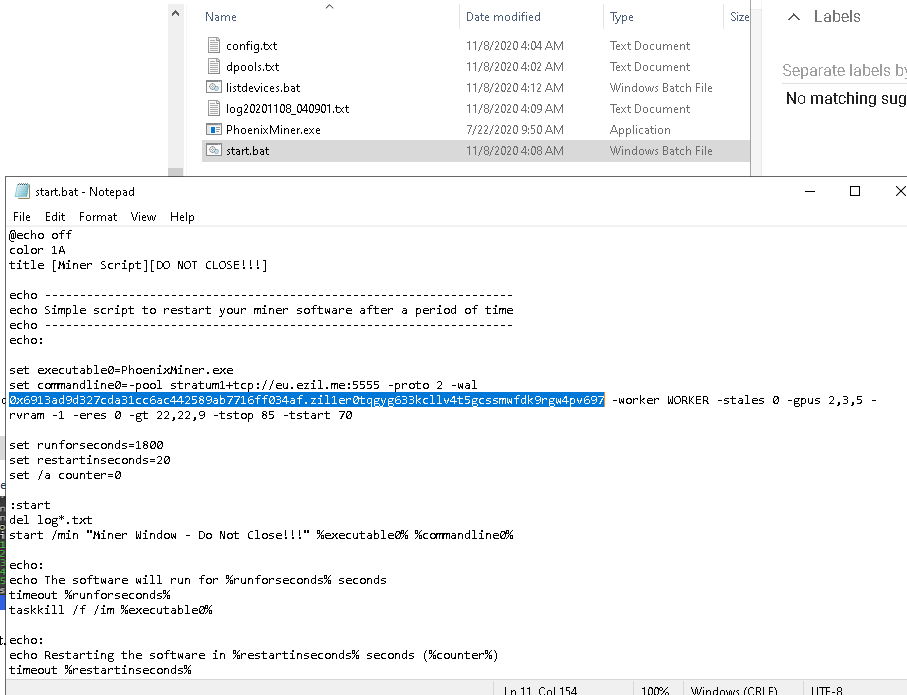
Next, edit start.bat put your own GPU details and replace the Eth and Zil wallet of your own. On example below, you will see that my Eth address and Zil address are combined. It is only separeted by a dot (.) Also, my start.bat file is not the same from Phoenix website as I've already configured it according to my needs. But you can use this if you want or just make your own.


What my start.bat script does is just automatically delete the log files created by the Phoenix Miner program open the Phoenix Miner program in a new window and then restart the miner according to my prefered time in seconds and you can change this option. You will see that option inside set runforseconds=1800 so my Miner restarts every 30 minutes.


BTC Donation: 
NiceHash: 3CT2grPjB28kqD2ofyeF1672J5tc2DrPw9
12ixDsxE3vVncQnv8KBemZKyNFtaajTA8y

ETH Donation : 
NiceHash: 0x18e0d077f6f9f77c2be65b8517096c6d6f421797
Binance: 0x6913ad9d327cda31cc6ac442589ab7716ff034af

ZIL Donation : 
Binance: zil1er0tqgyg633kcllv4t5gcssmwfdk9rgw4pv697
Zilpay: zil1h79vzrltlv43d5nnamh7858urq06acspfur7ng

Ripple Donation :
NiceHash: rGZV96HKpRbPCHbeYdtqE8Z5F74ULZ8o7E

Thats it! Have Fun! Cheers! =)


Friday, October 23, 2020

Watch Full Tagalog Action Comedy Movie 2020 Free Online - Stay At Home And Be Safe

Watch Free Action Tagalog Comedy Movie! No sign-up or registration is needed! Free For All! Enjoy!

Saturday, October 3, 2020

How to mine Etherium / ETH using RX550/RX570 4GB Graphics Card in Nice Hash

Can you still mine Etherium or ETH in an AMD 4GB Graphics Card in Nice Hash? Well, yes in my experience. I'm still using my old RX550 4GB and RX570 4GB Graphics Card. I usually mine using Nice Hash Miner but the problem is ETH mining using Claymore, Phoenix or TeamRed Miner is not working anymore using Nice Hash Miner GUI. I have installed all the plugins (miners) but mining ETH does not apear in the list. See screenshot below.

The only solution for me is to mine manually using the main miner program in command prompt or cmd. I'm using Windows 10 by the way and Phoenix Miner works best in my RIG as of this moment of writing.

I beleive that NH Miner choose the best Algo or the most profitable coin for us but what if you I still want to mine the Algo you like and NH is not correct? 

On below screenshot from NH statistics website, My 3x 4GB GPUs are mining kawpow algo using the NH Miner Application. That is because it was suggested on the benchmark (the best coin or algo to mine). Don't mind the other one mining BeamV3 it is not an AMD GPU. It is a Zotac P106-90 3GB that I bought online from China. =)


See another image below. 


Then, I have tried running Phoenix Miner 5.1c (latest one I think) in CMD and I can see that it is more profitable mining ETH than kawpow as of this moment and the Hashrate is still higher compared to mining kawpow algo. I'm not sure why does NH removed the ability in their GUI Application to mine ETH using low end graphics while it can still. So sad for me but I can't afford to buy the lastest GPU.


Below is a sample config that you can copy and save as your start.bat

@echo off
title [NiceHash Miner Script][DO NOT CLOSE!!!]
setx GPU_FORCE_64BIT_PTR 0
setx GPU_MAX_HEAP_SIZE 100
setx GPU_USE_SYNC_OBJECTS 1
setx GPU_MAX_ALLOC_PERCENT 100
setx GPU_SINGLE_ALLOC_PERCENT 100
PhoenixMiner.exe -pool stratum+tcp://daggerhashimoto.jp.nicehash.com:3353 -wal 3CT2grPjB28kqD2ofyeF1672J5tc2DrPw9 -pass x -proto 4 -stales 0 -gpus 2,3,5 -rvram -1 -eres 0 -gt 17,23,9
pause

Official Phoenix Miner Link https://phoenixminer.org/download/latest/

Note:

Similar Error in Claymore Miner: 

Not Enough GPU Memory to Place DAG 

Cannot Allocate Big Buffer For DAG 

Cannot Write Buffer For DAG 

Tuesday, September 22, 2020

This device cannot find enough free resources that it can use. (Code 12) If you want to use this device, you will need to disable one of the other devices on this system.

This problem occurs in Windows 10 when I added a new graphic card in my mining rig.The integrated graphics card (built-in graphics) becomes problematic as per image below and it is my Primary graphics connected to my Monitor. I don't want to use any of the RX570 as the purpose of that cards is primarily for mining bitcoins only.Although it is still useable without the drivers loaded, I cannot play games that required good graphics.
Currently, I'm just using a PCI Expansion Card 1 to 4 PCI Slots USB 3.0 Converter.
I'm not sure but I'm suspecting that this is the main problem since the motherboard (EMX-A70FM2+iCafe) has 2 PCIE slot only.
Rightnow, I'm planing to use Linux OS instead to see if the issue will be resolve.

Update: It is now fixed!
I just enabled Surround View in BIOS and set the built-in graphics (R7) to 1GB only